Guyana Passport Photo Requirements & Guidelines

Content Writer · Updated on August 4, 2026
TL;DR: The full guide to Guyana passport photo requirements — the 35x45 mm size, the white background, the head-height band, and the two-photo rule.
The Guyanese passport photo is the international 35 × 45 mm standard, so the size is straightforward. Where applications stumble is the detail: two identical prints, a fairly tight head-height band, and a strict no-glare rule that catches glasses and jewellery alike.
This guide covers every current Guyana passport photo requirement for 2026 — the 35 × 45 mm size, the plain white background, the 31.5–36 mm head height, and the pose, glasses, and quality rules the Guyana passport authorities apply.
Guyana Passport Photo Requirements at a Glance
Here are the core specifications for the Guyana passport photo:
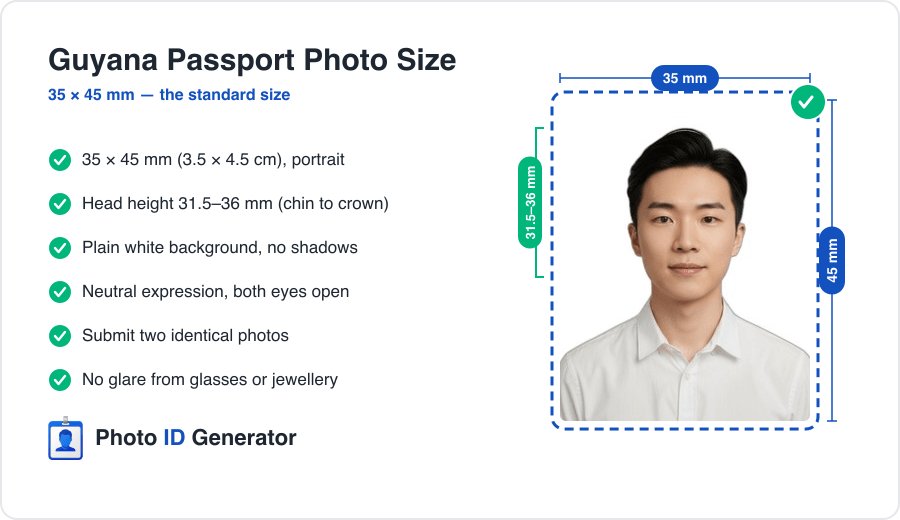
| Specification | Requirement |
|---|---|
| Photo size | 35 x 45 mm (3.5 x 4.5 cm), portrait |
| Head height | 31.5-36 mm, chin to crown |
| Head clearance | 3 mm above the top of the head |
| Background | Plain white, no shadows |
| Color | Full color, correct exposure |
| Copies | Two identical photos |
| Photo age | Taken within the last 6 months |
The no-glare rule is the quiet one — it applies to lenses *and* jewellery, not just the background.
Photo Size and Head Position Rules
Exact photo dimensions
The Guyana passport photo is 35 mm wide by 45 mm tall, the international ICAO standard. Exposure matters: the print must be neither washed out nor too dark, with correct contrast and clarity.
Head size and placement
Your head must measure between 31.5 mm and 36 mm from chin to crown, with at least 3 mm of clearance above the top of your head, centred in the frame. That fills roughly 70–80% of the photo.
Fitting a head-height band and a top margin at once is easy to get wrong by eye. You can create your Guyana passport photo and have the 35 × 45 mm frame and head height measured from your source image.
Two prints, exactly to spec
Upload one photo and get a compliant 35x45 mm Guyana passport photo — right head height, white background, two print-ready copies.
Background Requirements
Acceptable backgrounds
Guyana requires a plain white background, evenly lit, with no shadows, gradients, texture, or objects behind you.
Common background mistakes
- Shadow outlines behind the head from standing too close to the wall.
- Off-white walls — cream and pale grey photograph darker than they look.
- Overexposure blowing out a white background and losing your hairline.
- Clutter creeping into the frame.
Pose, Expression, and Lighting Rules
Expression and eyes
Keep a neutral expression with your mouth closed. Both eyes must be open and clearly visible, looking straight into the lens.
Lighting
Use soft, even, frontal light so both sides of your face match and there is no glare on your skin, glasses, or jewellery, and no shadow on the background. Correct exposure is explicitly part of the rule.
Glasses, Head Coverings, and Other Restrictions
Glasses and jewellery
Guyana calls out glare specifically — from glasses lenses and from reflective jewellery. The safest choice is to remove glasses and any shiny jewellery. Where glasses are worn, frames must not cover the eyes and the lenses must be completely glare-free.
Head coverings
Everyday hats and caps are not accepted. Religious head coverings are permitted provided the full face stays visible from the chin to the forehead, without shadow.
Editing and retouching
Do not alter the photo. No blemish removal, no skin smoothing, no filters, no AI enhancement — the image must show your natural appearance.
Digital Upload vs. Printed Photo Specs
Printed photo
Provide two identical 35 × 45 mm prints on photo paper, correctly exposed and free of creases, marks, or damage. The two-copy requirement is easy to overlook.
Digital photo
Where a digital file applies, keep the same 7:9 proportion at high resolution, sharp and naturally coloured with correct exposure. Avoid upscaling a small crop or letting a messaging app recompress it.
Top Reasons Guyana Passport Photos Get Rejected
- Only one photo — the two-copy rule is missed.
- Head height off — outside the 31.5–36 mm band, or missing the 3 mm top margin.
- Glare — on glasses lenses or jewellery.
- Exposure faults — a washed-out or too-dark print.
- Background faults — shadows, grey tones, or non-white walls.
- Retouched photos — smoothing, filters, or edited features.
- Outdated photos — older than six months.
One selfie, zero rejections
We build your photo to the exact Guyanese spec — 35x45 mm frame, correct head height, white background — as two glare-free copies.
How to Take a Compliant Photo at Home
- Find a plain white wall and clear everything else out of frame.
- Stand about half a metre in front of it to keep the background shadow-free.
- Face a window so your face is evenly lit from the front.
- Set the camera at eye level, 1.5–2 metres away.
- Remove glasses and reflective jewellery to avoid glare.
- Hold a neutral expression — mouth closed, both eyes open.
- Check exposure — not washed out, not too dark.
- Crop to 35 × 45 mm with your head at 31.5–36 mm and print two copies — or let an automated tool handle the framing.
Beyond Guyana: Other Countries' Requirements
Guyana shares its 35 × 45 mm size and two-photo requirement with much of the Commonwealth Caribbean, but the details differ next door: Jamaica varies the background by complexion, and Ghana asks for four prints instead of two. Same frame, different rules. If you are preparing documents for more than one country, our passport photo tool for 150+ countries applies each official spec to the same source photo.
Conclusion
Three rules decide a Guyana passport photo: the 35 × 45 mm frame with your head at 31.5–36 mm, a plain white, correctly exposed background, and two identical, glare-free, unedited prints. Mind the second copy and the glare, and the photo clears on the first pass.
Frequently Asked Questions
Need a compliant photo now?
Create a government-ready passport or visa photo in under 60 seconds.
Create My PhotoExplore more content
Namibia Passport Photo Requirements & Guidelines
The Namibia passport photo is a 37x52 mm portrait, not the 2x2 square many tools assume — and the rules are strict: no glasses, no head gear, no earrings. Here is the real spec.
Nepal Passport Photo Requirements & Guidelines
A Nepal e-passport photo is 35x45 mm on white, but the photo is captured live at enrolment — and a tika on the forehead is a common rejection. Here is what actually matters.
Netherlands Passport Photo Requirements & Guidelines
The Dutch passport photo is checked against an official template (the fotomatrix) with an unusually small 26–30 mm head. Miss the zones and it is rejected. Here is the full spec.