United States Passport Photo Requirements & Guidelines

Content Writer · Updated on June 16, 2026
TL;DR: A clear, up-to-date guide to U.S. passport photo requirements — exact 2x2 inch size, head position, background, digital file specs, and the 2026 rule banning AI-edited photos.
A rejected passport photo is one of the most common reasons U.S. applications get delayed — and it almost always comes down to small, avoidable mistakes in size, background, or head position. The good news is that the U.S. Department of State publishes exact passport photo requirements, and once you know them, getting it right at home takes minutes.
This guide breaks down every current United States passport photo rule for 2026 — the precise measurements, background and pose rules, digital upload specs, and the new restriction on AI-edited photos that catches many people off guard.
United States Passport Photo Requirements at a Glance
Here are the core specifications set by the U.S. Department of State, Bureau of Consular Affairs:
| Specification | Requirement |
|---|---|
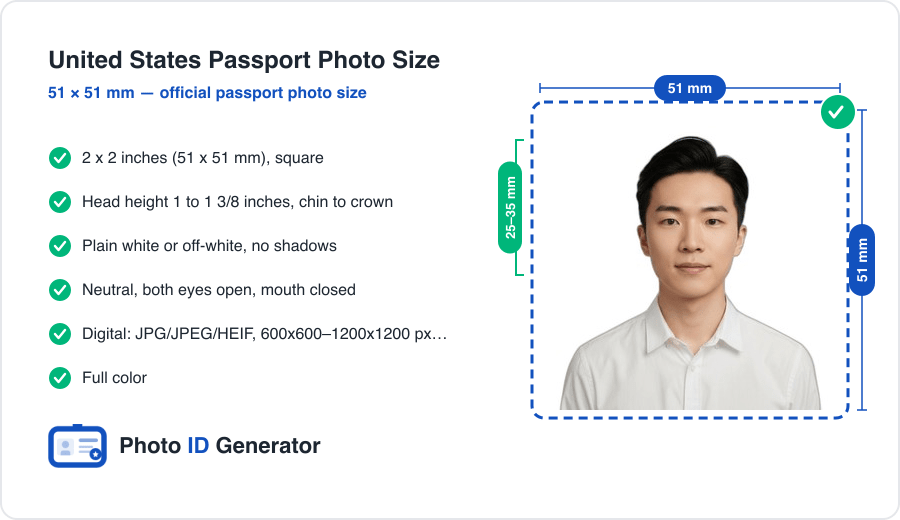
| Photo size | 2 x 2 inches (51 x 51 mm), square |
| Head height | 1 to 1 3/8 inches (25–35 mm), chin to crown |
| Background | Plain white or off-white, no shadows |
| Color | Full color |
| Photo age | Taken within the last 6 months |
| Expression | Neutral, both eyes open, mouth closed |
| Digital file | JPG/JPEG/HEIF, 600x600–1200x1200 px, 54 KB–10 MB |
Get any one of these wrong and the photo can be rejected, so it's worth checking each before you submit.
Passport Photo Dimensions and Head Position Rules
Exact Passport Size Photo Dimensions
The finished photo must be exactly 2 x 2 inches (51 x 51 mm). This is a square format — equal width and height — which is unusual compared to most countries that use a 35 x 45 mm rectangle.
Head Size, Placement, and Photo Measurement
Your head must be centered and sized so the distance from the bottom of your chin to the top of your head measures 1 to 1 3/8 inches (25–35 mm) — roughly 50% to 69% of the photo's height. Face the camera directly, without tilting or turning your head, and sit far enough back that your full head and the top of your shoulders are visible.
Getting these millimeters right by hand is where most people slip up. The simplest fix is to create your United States passport photo with a tool that crops and resizes to the exact official spec automatically.
Skip the measuring guesswork
Upload one selfie and get a perfectly sized 2x2 inch US passport photo with the background corrected and head positioned to State Department rules.
Background Requirements
Acceptable backgrounds
The background must be plain white or off-white. Stand a few feet in front of a blank wall so it does not cast shadows behind you, and light the wall evenly.
Common background mistakes
- Colored, patterned, or textured walls
- Shadows falling behind your head or shoulders
- Other people, furniture, or objects in the frame
- Doorframes, light switches, or wall fixtures creeping into the shot
Pose, Expression, and Lighting Rules
Expression and eyes
Keep a natural, neutral expression with both eyes open and your mouth closed. A relaxed, normal face is what the State Department expects — not a wide smile.
Lighting
Use even, front-facing light to avoid shadows on your face or under your chin. Keep your head straight, hair off your face, and both ears visible where possible. Avoid earbuds, headphones, or wireless devices.
New for 2026: No AI-Edited or Filtered Photos
What is banned
The Department of State requires you to submit the original, unchanged photo. You may not alter it using computer software, phone apps, filters, or artificial intelligence. A beautify filter that smooths skin, slims your face, or changes your features will get the photo rejected because it no longer accurately represents you.
What is still allowed
Standard processing that does not change your appearance is fine — for example, removing the background, correcting it to plain white, and cropping to the official 2 x 2 inch size. The distinction is simple: adjusting the photo's background and size is allowed; altering your face is not.
Glasses, Head Coverings, and Other Passport Photo Criteria
Glasses
Glasses are not allowed in U.S. passport photos — a rule in place since 2016. The only exception is for documented medical reasons, which requires a signed doctor's statement.
Head coverings
Head coverings are not permitted unless worn daily for religious or medical reasons. Even then, your full face must be visible from the bottom of the chin to the top of the forehead, and a signed statement may be required.
Digital vs. Printed Passport Photo Specifications
Printed photo
For paper applications and first-time applicants, submit one physical 2 x 2 inch color photo printed on matte or glossy photo-quality paper.
Digital photo
For online renewal, upload a JPG, JPEG, or HEIF file that is square, between 600 x 600 and 1200 x 1200 pixels, and 54 KB to 10 MB in size. The composition rules are identical to the printed version — only the delivery format changes.
Top Reasons U.S. Passport Photos Get Rejected
- Wrong head size — too small or too large within the 2 x 2 inch frame
- Shadows on the face or background from uneven lighting
- Non-white background or visible objects behind you
- Glasses left on, or lens glare
- Smiling or a non-neutral expression
- Filtered or AI-edited photos that alter your appearance
- Old photos taken more than six months ago
Not sure your photo will pass?
Our engine checks size, background, and head position against official US standards before you download — so you get it right the first time.
How to Meet United States's Passport Picture Requirements at Home
- Stand 2–3 feet from a plain white wall in even light, with no shadows behind you.
- Have someone photograph you at eye level from about 4 feet away, or use a tripod and timer.
- Face the camera directly with a neutral expression, eyes open, mouth closed, and no glasses.
- Shoot in color at the highest resolution your phone or camera allows.
- Upload it to a tool that removes the background and crops to the exact 2 x 2 inch, 25–35 mm head-height spec.
- Download both the print-ready file and the digital version for online upload.
Beyond the United States: Other Countries' Requirements
Specifications differ widely between countries — most of the world uses a 35 x 45 mm photo rather than the U.S. 2 x 2 inch square, with different background and head-ratio rules. If you travel or apply internationally, you can check the rules and generate a compliant photo using our passport photo tool for 150+ countries.
Conclusion
A compliant U.S. passport photo comes down to three things: the exact 2 x 2 inch size with a 25–35 mm head height, a plain white background with no shadows, and a neutral, unedited photo taken within the last six months. Nail those and you avoid the most common rejection reasons.
Frequently Asked Questions
Need a compliant photo now?
Create a government-ready passport or visa photo in under 60 seconds.
Create My PhotoExplore more content
Mongolia Passport Photo Requirements & Guidelines
A Mongolia passport photo is 35x45 mm on white, but the system is digital-first: an e-Mongolia photo portal wants a precise 413x531 px file. Here is the full spec.
Mauritius Passport Photo Requirements & Guidelines
A Mauritius passport photo must be printed matt, not glossy — a glossy finish is a frequent rejection. That, plus a police-certified paper form, is what actually matters.
Malta Passport Photo Requirements & Guidelines
Malta is the rare country where a white background gets your passport photo rejected — it wants light grey or cream. That, plus a one-month freshness rule, is what catches people.