Jamaica Passport Photo Requirements & Guidelines

Content Writer · Updated on August 11, 2026
TL;DR: The full guide to Jamaica passport photo requirements — the 35x45 mm size, the unusual complexion-based background rule, the matte finish, and the two-photo requirement.
Jamaica's passport photo has a rule you will not find almost anywhere else: the background colour depends on your complexion and hair. The Passport, Immigration and Citizenship Agency (PICA) asks for white, pastel, or pale blue depending on how you photograph — all to keep your face and hair clearly separated from the background.
This guide covers every current Jamaica passport photo requirement for 2026 — the 35 × 45 mm size, the complexion-based background, the matte finish, and the head-position and copy rules PICA applies.
Jamaica Passport Photo Requirements at a Glance
Here are the core specifications for the Jamaican passport photo:
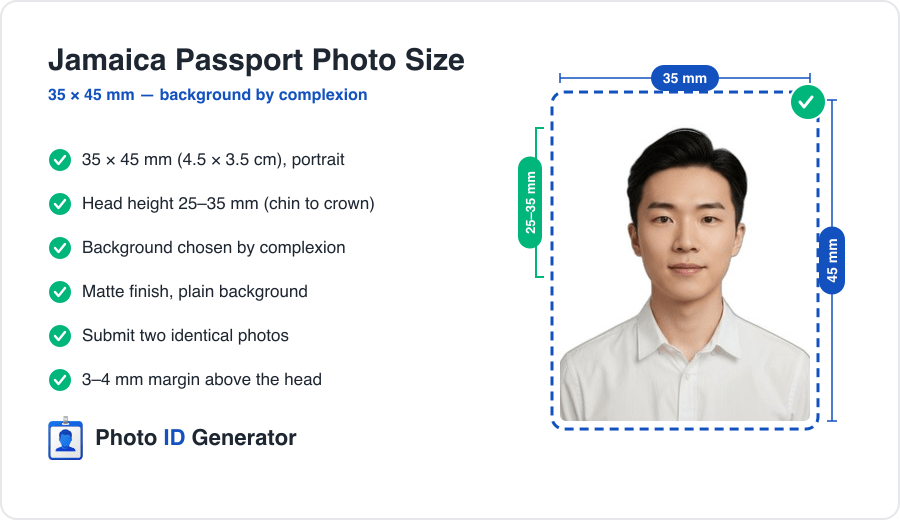
| Specification | Requirement |
|---|---|
| Photo size | 35 x 45 mm (45 mm high x 35 mm wide) |
| Head height | 25-35 mm, chin to crown |
| Head margin | 3-4 mm above the head |
| Background | Chosen by complexion (see below) |
| Finish | Matte / dull, plain |
| Copies | Two identical photos |
| Photo age | Taken within the last 6 months |
The background rule is the one to read carefully — there is no single "correct" colour for everyone.
Photo Size and Head Position Rules
Exact photo dimensions
The Jamaican passport photo is 45 mm high by 35 mm wide — the standard 35 × 45 mm portrait format. Photographs must be printed with a matte or dull finish, not glossy.
Head size and placement
Your head should measure between 25 mm and 35 mm from chin to crown, with a 3–4 mm margin between the top of your head and the edge of the photo when it is cut. The full outline of the face, from the bottom of the chin to the top of the forehead, must be clearly shown.
Getting the head height and the cut margin right by hand is fiddly. You can create your Jamaica passport photo and have the 35 × 45 mm frame and head height measured from your source image.
Two matte prints, exactly to spec
Upload one photo and get a compliant 35x45 mm Jamaica passport photo — right head height, complexion-matched background, two print-ready copies.
Background Requirements
Choosing the right background for your complexion
This is Jamaica's distinctive rule — PICA sets the background by how you photograph:
- Darker complexion: wear coloured clothing and use a plain white background.
- Lighter complexion: avoid white clothing and use a pastel-shaded background.
- Grey or white hair: use a pale blue or pastel background.
The goal in every case is contrast: your face, hair, and clothing must be clearly distinguishable from the background.
Common background mistakes
- Everyone defaulting to white — wrong for lighter complexions and grey/white hair.
- White clothing on a white background — the outline of the shoulders disappears.
- Shadow outlines behind the head from standing too close.
- Glossy prints — the finish must be matte.
Pose, Expression, and Lighting Rules
Expression and eyes
Keep a neutral expression with your mouth closed and both eyes open, looking straight into the lens.
Lighting
Use soft, even, frontal light so both sides of your face match and the background stays a single uniform tone. Even lighting matters more here because the background is chosen specifically for contrast.
Glasses, Head Coverings, and Other Restrictions
Glasses
Remove your glasses unless they are medically required. Where worn, frames must not cover the eyes and the lenses must be free of glare, reflection, and tint.
Head coverings
Everyday hats and caps are not accepted. Religious head coverings are permitted provided the full face stays visible from the chin to the forehead, without shadow.
Editing and retouching
Do not alter the photo. No blemish removal, no skin smoothing, no filters, no AI enhancement — the image must show your natural appearance.
Digital Upload vs. Printed Photo Specs
Printed photo
Provide two identical 35 × 45 mm prints on photo paper with a matte finish, on the complexion-appropriate background, free of creases, marks, or damage.
Digital photo
Where a digital file applies, keep the same 7:9 proportion at high resolution on the correct background, sharp and naturally coloured. Avoid upscaling a small crop or letting a messaging app recompress it.
Top Reasons Jamaica Passport Photos Get Rejected
- Wrong background for your complexion — e.g. white for a light complexion, or white for grey/white hair.
- Glossy prints — the finish must be matte.
- Head height off — outside the 25–35 mm band, or the wrong cut margin.
- Low contrast — white clothing on a white background.
- Only one photo — the two-copy rule is missed.
- Retouched or outdated photos.
One selfie, zero rejections
We build your photo to the exact Jamaican spec — 35x45 mm frame, correct head height, complexion-matched background — as two matte copies.
How to Take a Compliant Photo at Home
- Choose your background by complexion — white for darker complexions, pastel for lighter, pale blue for grey/white hair.
- Stand about half a metre in front of it so no shadow falls behind you.
- Dress for contrast — avoid clothing that matches your background.
- Face a window for even, frontal daylight.
- Set the camera at eye level, 1.5–2 metres away.
- Hold a neutral expression — mouth closed, both eyes open.
- Remove glasses and any non-religious head covering.
- Crop to 35 × 45 mm with your head at 25–35 mm and a 3–4 mm top margin, print two matte copies — or let an automated tool handle the framing.
Beyond Jamaica: Other Countries' Requirements
Jamaica's complexion-based background is almost unique — most countries name a single colour for everyone. Its Caribbean neighbours keep it simpler: Guyana and Dominica use plain light backgrounds regardless of complexion. Same 35 × 45 mm frame, very different background rule. If you are preparing documents for more than one country, our passport photo tool for 150+ countries applies each official spec to the same source photo.
Conclusion
Three rules decide a Jamaican passport photo: the 35 × 45 mm frame with your head at 25–35 mm, the background chosen for your complexion and hair, and two identical matte prints. Pick the right background for how you photograph, and the photo clears on the first pass.
Frequently Asked Questions
Need a compliant photo now?
Create a government-ready passport or visa photo in under 60 seconds.
Create My PhotoExplore more content
Mongolia Passport Photo Requirements & Guidelines
A Mongolia passport photo is 35x45 mm on white, but the system is digital-first: an e-Mongolia photo portal wants a precise 413x531 px file. Here is the full spec.
Mauritius Passport Photo Requirements & Guidelines
A Mauritius passport photo must be printed matt, not glossy — a glossy finish is a frequent rejection. That, plus a police-certified paper form, is what actually matters.
Malta Passport Photo Requirements & Guidelines
Malta is the rare country where a white background gets your passport photo rejected — it wants light grey or cream. That, plus a one-month freshness rule, is what catches people.